A focused Android camera for producing upload-ready photos
You often face form portals that refuse oversized images; Byte Camera by Ingale Labs addresses that need with a photography app that targets file-size compliance before you shoot. The app lets you choose predefined size presets, shows a live preview with flash control, and processes images on-device while removing EXIF metadata. If you need reliable, privacy-conscious photos for visa forms, HR systems, or bandwidth-limited messaging, this tool helps you produce acceptable files quickly.

Unlock your creativity with Adobe Stock
Get 10 images or 1 video with a free trial
What is Byte Camera used for?
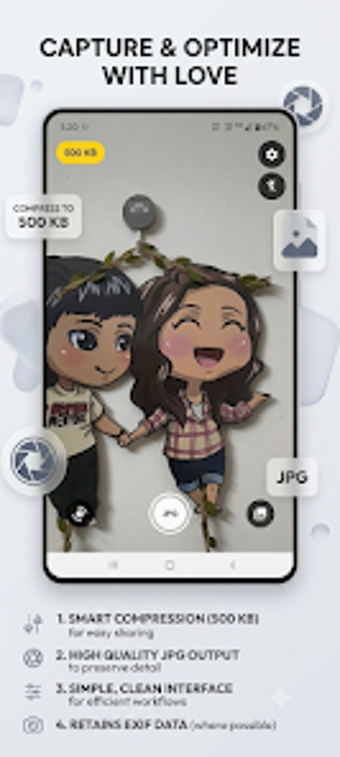
Byte Camera is a niche capture tool that helps you produce images that meet strict upload constraints, rather than maximizing megapixels. The app applies a binary-search compression routine at capture time so images aim for a selected file-size target. This design suits situations where online forms and government portals reject large attachments, because the workflow centers on producing a compliant image the first time you shoot.
What file sizes does it support and how strict is the limit?
The app offers preset targets from 10 KB up to 500 KB and guarantees outputs do not exceed the chosen limit. You can pick thumbnail or near-original presets depending on the destination, and the interface shows an instant quality star rating after compression. One-tap sharing follows capture, so you can forward a bounded-size image to email or messaging without extra conversion steps.
How approachable is the workflow for non-technical users?
You start with simple presets and a live camera preview that includes flash control, which keeps the capture step familiar. Instant previews and a visible quality rating indicate whether the selected limit compromises the image. Preset-driven sizing and one-tap sharing reduce manual tweaking, so people who just need compliant photos for official applications can complete the task without learning advanced controls.
How does the app handle image quality and privacy?
The app applies smart quality enhancements such as noise reduction, auto-sharpening, and multi-step resizing to reduce aliasing while compressing. It warns you when a chosen limit will significantly degrade the image, helping you decide whether to choose a larger preset. Processing happens locally on your device and the app includes an option to strip EXIF metadata, supporting privacy-focused use cases.
A practical gateway for anyone who needs compliant images
If your main goal is to meet upload constraints rather than perform creative retouching, the app is a sensible entry point that reduces guesswork and extra resizing steps. Expect a trade-off: it prioritizes predictable, policy-friendly output over broad editing capability. Choose it when you want a low-friction, privacy-minded path to images that satisfy strict submission rules.